Connect photo-based risk assessment drafts, subcontractor TBMs, inspections, and actions to cut repetitive paperwork and unify safety management
Repetitive work across work types and subcontractors
Civil works, excavationWork type 1
Write risk assessment
Temporary works, scaffolding, formworkWork type 2
Rewrite
Reinforced concrete, pouringWork type 3
Rewrite
Rebar workSubcontractor 1
Write TBM log
FormworkSubcontractor 2
Collecting signatures
ExcavationSubcontractor 3
Not written
Re-collect inspection and training recordsSite office
Every report
Check missing signatures and open actionsSite office
One by one, by hand
Safety management built for construction sites
From subcontractor TBMs to joint safety inspections and OSH costs, SAFE U WORKS supports safety management for the principal contractor and each site, following the way construction work flows
Safety & Health ManagementDocuments, inspections, training
Safety Goals & Policy
Safety Organization
Risk Assessment
Implementation Checks
Emergency Response & Accidents
Safety Training
Worker Feedback
Construction Site ResponseSubcontractors, work types, inspections
Site Safety Dashboard
Subcontractor TBM
Joint Safety Inspection
Patrol Inspection Log
OSH Cost Management
Work Plans & Work Permits
Find Site Hazards
Unified Head Office & SitesAI work support, collaboration, operations status
Head Office & Site Settings
All-Site Dashboard
AI Assistant Worky
AI Voice Notes
Approval Inbox & Notifications
Custom Print Forms
Construction safety and health duties are getting stricter
From building a safety and health management system to risk assessments, inspections, and follow-up actions, you need a system that manages each site's process and results consistently
Effective January 27, 2024
SAPA coverage expanded
Now covers projects under KRW 5 billion
Stronger duties to build and run a safety and health management system
Effective August 1, 2026
Safety and health disclosure begins
Builders with KRW 120 billion or more in annual construction value must disclose their safety and health status
Employers with 500 or more regular workers have the same duty
Effective January 1, 2027
Fines for risk assessment violations
Phased fines for skipping risk assessments or breaching participation, sharing, or record-keeping duties
Applies to projects of KRW 5 billion or more first, and to smaller projects from January 1, 2028
Site management with less repetitive work
AI agent Worky helps draft risk assessments and connects TBMs, inspections, actions, and reporting in one flow
Site management with less repetitive work table
Item
The old way
Risk assessment
Risk assessmentRewritten on a blank form every time the work type changes
Start by reviewing hazards and control measures suggested from the work type and task details
Source check
Source checkArticles and guidelines are looked up separately and pasted into the table
Review draft hazards and control measures together with related laws and KOSHA Guides
TBM log
TBM logRisk assessment content is copied into the TBM log by hand
Load the risk assessment checklist to write the TBM log
Inspection records
Inspection recordsDaily, weekly, patrol, and joint inspection records end up scattered
Keep records and follow-up actions for every inspection type in one place
Signatures and actions
Signatures and actionsMissing signatures and open actions are checked one by one
See safety activity status and open actions on one screen to spot what needs attention
Reports
ReportsThe data needed is searched for and organized again for every report
Review inspection and OSH cost records together and print them as the reports you need
Construction risk assessment
From site photos to a risk assessment draft
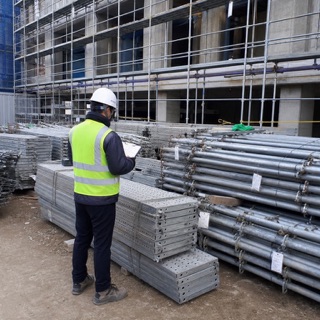
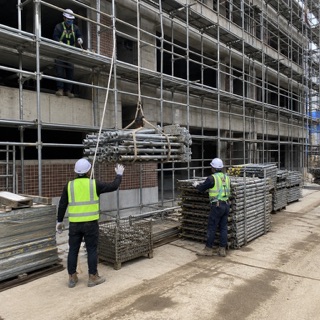
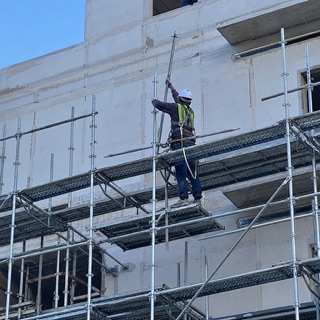
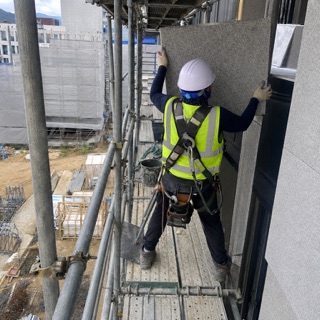
1. Upload site photos and they're sorted by work step automatically
The AI agent suggests likely work types from the photos and sorts them into work steps based on the standard process. Steps without photos are added from standard data.
2. Review hazards, control measures, and related laws together
The AI agent suggests hazards and control measures for each work step, along with the related laws. Comparing with standard data also shows hazards that need a closer look.
Hazards in the photo
123
Control measures · related laws Occupational Safety and Health Standards Rules
Hazard · controlRelated laws · click for original text
1Fall from platform edgeArticle 44
Hazard · control2Scaffold materials falling during liftingTwo-leg sling · tied at least twice · no entry below the lifting zoneRelated lawsArticle 14Prevention of danger from falling objects
3Fall through an openingArticle 43
3. Turn risk assessment results into a TBM checklist
What you wrote in the risk assessment becomes the TBM checklist. Workers review and sign via QR without installing an app.
Checklist Priority 2 · Daily 2
Install anchor points, then clip on harnessesInstallationPriority
Two-leg sling · tie lifted loads at least twiceInstallationPriority
Check for damaged or bent partsInstallationDaily check
Guardrails at edges · openingsInstall safety facilitiesDaily check
3. Check TBM signatures, then issue the work permit
The work permit shows TBM signatures and pre-issue check results together. If anyone missed the TBM, update the crew before issuing.
Work permit 26-152 Not issued
Bldg A 2F fire piping welding · Works MEP · Hot work
Pre-issue checkResultAction
Pre-issue checksAll checked: common 14 · hot work 8Confirmed
Pre-issue checkMissed TBMResultS. Lee, fire watchActionUpdate crew
Gas measurementOxygen · flammable gas OK · 07:30Confirmed
OSH Costs
From receipt upload to evidence number stamps
1. Receipts are read into the expense list, with duplicate or ineligible evidence flagged in advance
The AI agent reads amounts and items and suggests the statutory category. Duplicate evidence and items such as electricity bills or insurance premiums are flagged before they're added.
Upload evidence
Receipt
Supplier
Works Safety Supply Co., Ltd.
Issued
2026.10.14
Hard hat20300,000
Harness (full body)10450,000
Safety shoes10390,000
Total VAT incl.1,254,000
Receipt · 1 photo
Expenses October 2026
ItemQtyNet priceItem
Hard hat20300,000PPE
Works Safety Supply · 2026.10.14Harness (full body)Qty10Net price450,000SuggestedPPE
2. Evidence numbers are stamped once the general contractor confirms
When the general contractor confirms the expenses, each piece of evidence is stamped with an evidence number, ready for printing and settlement checks.
Evidence folder October 2026Confirmed
Receipt
Total1,254,000
Evidence No.PG-2610-0304
Receipt · PPE
Tax invoice
Total902,000
Evidence No.PG-2610-0201
Tax invoice · Safety facilities
Statement
Total330,000
Evidence No.PG-2610-0501
Statement · Training
Receipt · PPEPG-2610-0304SitePGPyeongtaek Godeok site initialsMonth2610October 2026Category03PPENo. in category044th PPE item that month
Construction safety
All construction safety work in one place
Draft and manage hazards and control measures by work step, based on site photos and work types
Load the risk assessment checklist to log each subcontractor's TBM, and workers review and sign via QR
See the safety activity completion rate and each subcontractor's TBM and signature status on one screen
Record item results and needed improvements from inspections held with subcontractors, and follow corrective actions through to the end
Review and approve what subcontractors register, from spending plans to actual expenses
Works Construction · Logistics Center ProjectSafety Manager Worky
Hazards and control measures
Works Construction Logistics Center ProjectWork period2026.11.10 ~ 2026.11.28ApprovalE-approvalWritten1 of 1 tasks
Work steps 5
Hazards · controls 9
Priority 3
Assessment by task
Temporary works1 task · 9
System scaffold install · dismantle9
Step details
1Review installation plan
2Unload and move materials
3Installation
4Install safety facilities
5Dismantling
Add step
Temporary works ›System scaffold installation and dismantling
LocationBldg A exterior 2F ~ 5FSubcontractorWorks ScaffoldingWorkers8SupervisorWorks Scaffolding foreman
EquipmentMobile craneAerial liftMaterialsSystem scaffoldSafety net
NoHazardControl measuresBeforeAfterPriority
1Review installation plan1 hazard
1
Poor review of the installation plan leads to scaffold collapse and falls
Task-related
Check structural safety (assembly drawing, wall tie spacing) before work
31 m or taller: structural check by a qualified expert
12HighFreq 3 · Sev 4
3LowFreq 1 · Sev 3
3Installation3 hazards
2
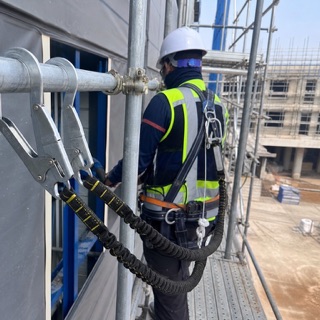
Fall while assembling scaffold at the platform edge without clipping on a harness
Environmental
Install anchor points, then clip on harnesses
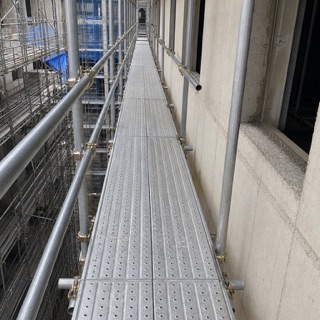
Install standard guardrails at edges and openings
16HighFreq 4 · Sev 4
2LowFreq 1 · Sev 2
3
Scaffold materials fall during lifting and strike workers below
Mechanical
Use a two-leg sling and tie lifted loads at least twice
Keep people out from under the lifting zone
12HighFreq 3 · Sev 4
2LowFreq 1 · Sev 2
4
Scaffold collapses because damaged or deformed parts are used as is
Task-related
Inspect every part for safety certification and for damage, deformation, or corrosion
9HighFreq 3 · Sev 3
2LowFreq 1 · Sev 2
Add hazard
Works Construction · Logistics Center ProjectSafety Manager Worky
Works CivilExcavation · Bldg B dig · 6 workersNot written
Signing · 1
Works RebarRebar placing · signed 9 / 12Awaiting signatures
SourceSubcontractor TBM status
I couldn't find an answer to that in the site records. Ask about subcontractor TBMs, approvals, hazard actions, or on-site interpretation, and I'll answer with sources.
Source · Not confirmed · No related records
AI agent Worky
An AI agent for construction sites that answers with sources and stays ahead of what to do next
Record a TBM meeting and Worky transcribes it live, separates speakers, and organizes it into the TBM meeting form
Frequently asked questions
What is SAFE U WORKS Construction?
SAFE U WORKS Construction is an AI-based platform that manages construction site safety work, including risk assessments, TBMs, inspections, and training, in one place. It connects everything from drafting documents to subcontractor participation, implementation checks, and record keeping to support safety management at the site and at head office.
We work with many subcontractors. Does each one need its own account?
You can invite subcontractor contacts by mobile number, and invited users see only the items that belong to their own subcontractor.
Our site has many foreign workers. Do workers need to install an app?
No. They open it with a QR code to review and sign. The QR page appears in Korean, English, or Chinese based on the browser language.
Does generating a risk assessment meet all legal duties?
A draft written by the AI agent does not meet legal duties on its own. The person in charge must review the site's actual work conditions and hazards, and carry out the assessment and follow-up actions under the related laws.
How do we adopt SAFE U WORKS Construction?
We offer a self-hosted option for principal contractors managing many sites, and a subscription option for individual sites and subcontractors. After checking your operating scale and management scope, we recommend the right option and provide a quote.
Dedicated support from onboarding to operation
SETUP
Initial setup support
We set up your site information, such as sites, subcontractors, and work types, and train your users
MANAGER
Dedicated account manager
A dedicated manager handles your questions and requests, from onboarding preparation through daily operation.
REMOTE
Remote technical support
If a problem comes up while using the service, we check it remotely and help resolve it.
GUIDE
Manuals and guides
Manuals and video guides help site staff get started and keep the service running smoothly.
UPDATE
Regular checks and updates
We check the service regularly and improve features based on legal changes and customer feedback.
Safety management that connects sites and head office
Connect risk assessment drafts, subcontractor TBMs, and inspection and action recordsto lighten site workloads and unify safety management across head office and sites




 1
 1
 2
 2
 3
 3


 Add attendees
 Analyzing TBM meeting


 Analyze again


 Saving your recording securely.
 AI Voice Note saved.
